> For the complete documentation index, see [llms.txt](https://docs.avantprotocol.com/llms.txt). Markdown versions of documentation pages are available by appending `.md` to page URLs; this page is available as [Markdown](https://docs.avantprotocol.com/overview/using-avant-protocol/staking-for-savassets.md).
# Staking for savAssets
**Staking** is the process of depositing your `avAsset` to earn yield. By staking, you exchange an `avAsset` (e.g., `avUSD`) for its corresponding yield-bearing `savAsset` (e.g., `savUSD`), which represents the Senior Tranche.
### Step-by-Step Guide
1. **Open Your Product Page:** In the [Products](https://app.avantprotocol.com/products) section, open the page for the product you want to use.
2. **Open Earn and Select Senior:** Select **Earn**, choose **Senior**, then select the **Stake** tab.
3. **Choose Amount and Destination:** Enter the `avAsset` amount to stake. The product's native-chain `avAsset` is preselected; choose an eligible destination chain for the `savAsset` output.
4. **Review Output and Route:** Check the expected `savAsset` output and fees. If you selected another chain, click route details to view the included bridge and stake stages.
5. **Approve and Confirm:** Approve the selected input token amount, then confirm **Stake**.
Your staked token balance (e.g., `savUSD`) will now appear on your dashboard. The value of this `savAsset` increases as the protocol distributes yield, meaning it can be redeemed for more of its underlying `avAsset` in the future.
{% hint style="info" %}
To learn more about the different token types, visit the [Core Tokens](/overview/core-tokens.md) page.
{% endhint %}
Staking avUSD
{% hint style="info" %}
## How Staked Tokens' Value Grows
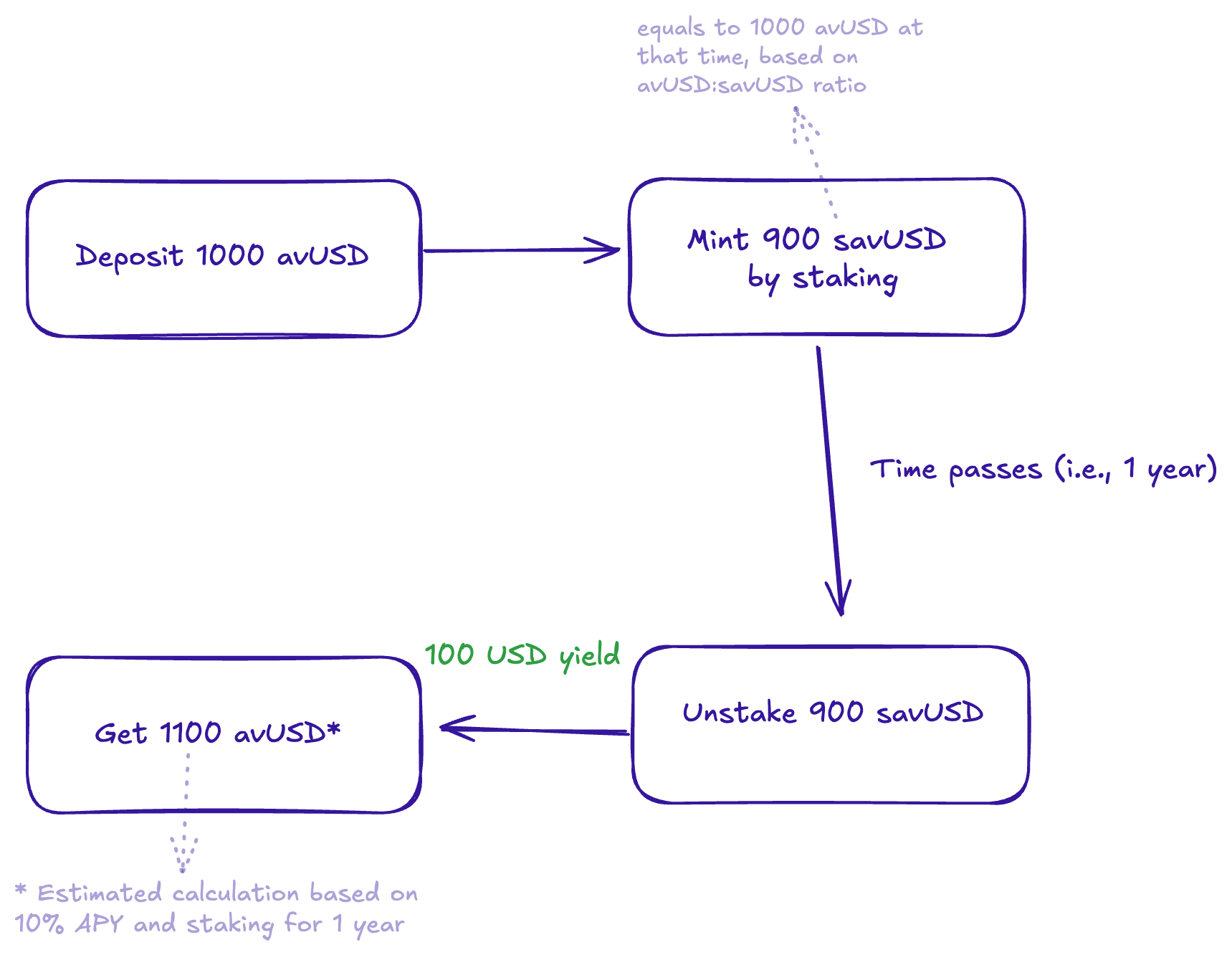
You might notice that when you stake, say, **1000 `avUSD`**, you receive a slightly lower number of `savUSD` tokens, for example, **900 `savUSD`**. Don't worry, the total value is exactly the same at that moment. The key is that your `savUSD` tokens (i.e., **900 `savUSD`**) will grow in value over time as yield is earned by the protocol, eventually becoming worth more than your initial deposit.
{% endhint %}
A sample diagram to show how the staked tokens' value grows